| » Forum Index » Announcements » Topic: Photoshop rotate object – WOW!!! |
|
Posted on 13/03/26 11:01:31 AM |
|
Steve Caplin
Administrator Posts: 7169 Reply  |
Photoshop rotate object – WOW!!!
The latest beta of Photoshop dropped this morning. Here's an incredible new feature: Rotate Object. I started with these people: 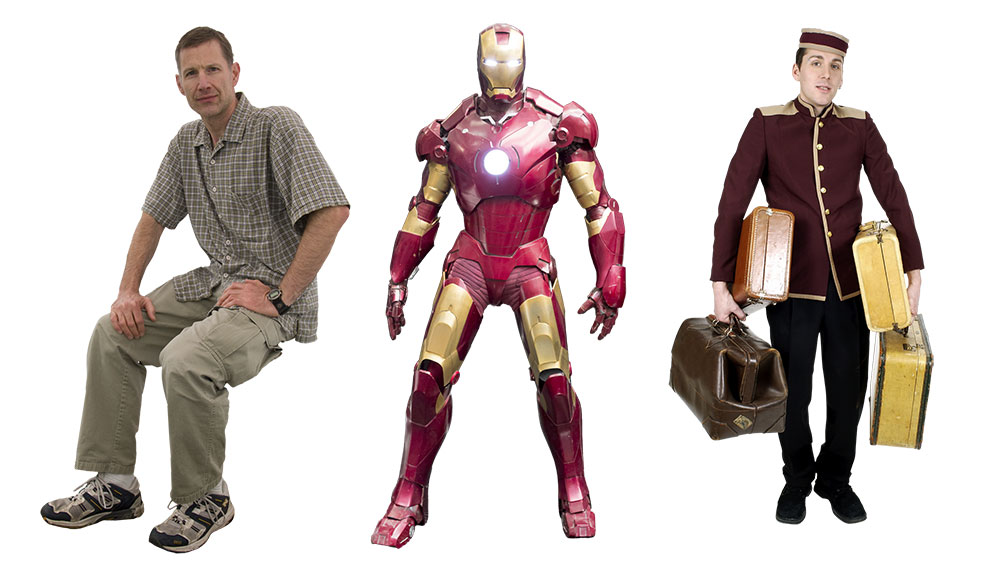
And this background: 
I placed the people and rotated them using the new feature in Free Transform: 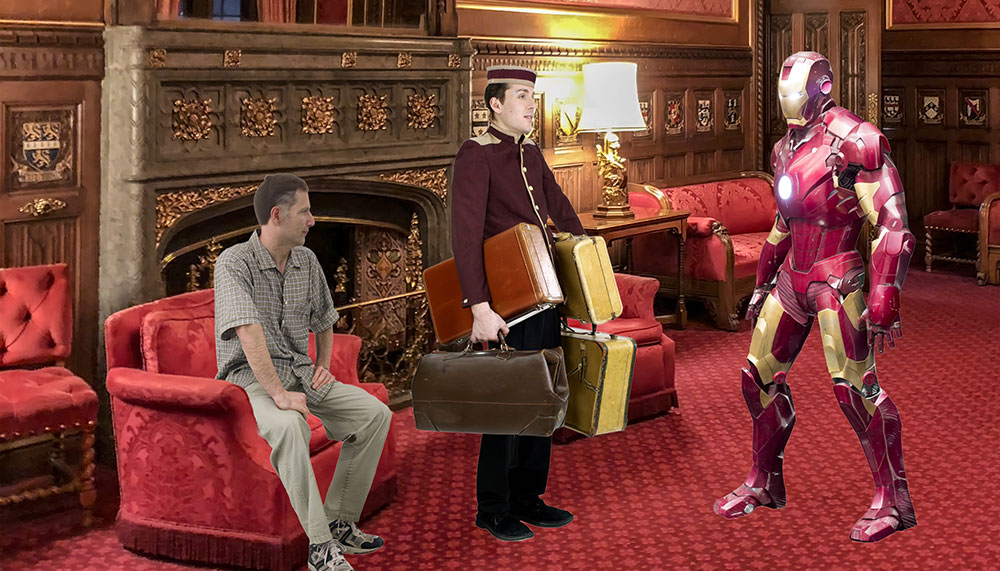
Then used Harmonise to blend them into the scene: 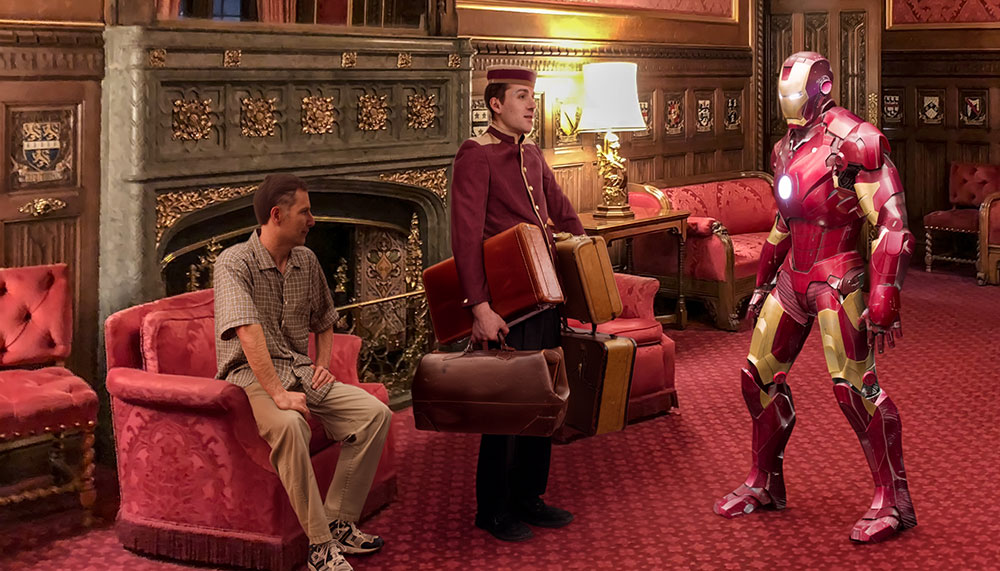
Wow! I mean, WOW!!! See my YouTube video here. |
Posted on 13/03/26 4:53:55 PM |
|
GKB
Magical Montagist Posts: 4155 Reply  |
Re: Photoshop rotate object – WOW!!!
Very interesting Steve. I had to check my calendar to make sure I hadn’t skipped forward a few days to April 1st. Truly astonishing the way it built in details that were not in the original images such as the legs, face and items on the desk top. As you said - ‘Wow’. _________________  |
Posted on 13/03/26 5:46:35 PM |
|
DavidMac
Director of Photoshop Posts: 6198 Reply  |
Re: Photoshop rotate object – WOW!!!
Wow but not Wow! Yes! It's utterly amazing! No, it's not very rewarding. I often use cooking parallels here because, like Photoshop, it's something I love. It's an objective/subjective passion that carries great rewards and, like Photoshop, it's based on a combination of creativity and acquired personal skills. If your only interest is results, then this is truly fantastic! ................ .................... To me it's the equivalent of microwave ready frozen meals ........ and every bit as exciting and rewarding. Now I'll go crawl back under my log and grizzle there. _________________ The subtlety and conviction of any Photoshop effect is invariably inversely proportional to the number of knobs on it ....... |
Posted on 14/03/26 10:34:43 AM |
|
GKB
Magical Montagist Posts: 4155 Reply |
Re: Photoshop rotate object – WOW!!!
I had a look at Unmesh Dinda’s (Piximperfect) YouTube video on this subject. He goes into it in detail like Steve but, importantly, shows some of the limitations. It’s a good watch. I know it’s still in beta but Adobe still has work to do. http://youtu.be/2k9lIsGazqc?si=kKdHDi2PyRvyF_oq If you have never come across Unmesh before do check out his YouTube channel; he covers a lot of really good tutorials on lots of Photoshop techniques. _________________ Whatever you do in life do it with the enthusiasm of a 4-year old in a Batman suit. |
Posted on 14/03/26 1:43:30 PM |
|
DavidMac
Director of Photoshop Posts: 6198 Reply |
Re: Photoshop rotate object – WOW!!!
Although, for me, the pleasure of Photoshop lies in the challenge of the manipulation and creation as much as the result, making this a feature of limited appeal, I was nonetheless fascinated to find out what it could do and put it through it's paces. I don't keep Beta installed because it has an irritating way of co-opting file associations and opening everything unless you re-set file associations and it doesn't like importing all my custom settings and workspace either. But I downloaded it this time to try this magical tool. I didn't get very far. After just three trials I got a message that I had used up my introductory credits and must upgrade to get this Premium feature. I am on the Photographer's plan (Photoshop and Lightroom). This has always been sufficient until recently when more and more 'in app' upgrades are needed. So far I haven't needed the Premium features badly enough to upgrade. We shall see ............. So I haven't really been able to check this out as much as I would like. Mostly it was very good as long as you don't push it too far. But not always. I tried it on a photo from my "Painless Parker" researches. This is what happened when I tried to rotate it to face us just a tiny bit. 


Admittedly it's of desperately poor quality so probably a very unfair test. Even so, man on elephant is not is not hard to 'recognise' and it had no problem with the extraction from the background. Unfair test aside, it was obvious from the word go that Photoshop can only do this by 'inventing' stuff. It has to create what it cannot see, either by interpolation from what it can, or from 'experience' of similar objects. It's a given that in many cases it's going to be hit and miss and that it's going to be better at symmetrical objects or objects it 'knows'. I was interested to see that Unmesh was quick to point this one out too. As I said in my previous post, I don't like 'Just pop in the microwave' solutions. For me the pleasure lies in the doing as much as the result. But here is something I couldn't do any other way so I shall be interested to see where this goes even if I'm not attracted to use it myself. _________________ The subtlety and conviction of any Photoshop effect is invariably inversely proportional to the number of knobs on it ....... |
Posted on 14/03/26 1:48:36 PM |
|
DavidMac
Director of Photoshop Posts: 6198 Reply |
Re: Photoshop rotate object – WOW!!!
By the way Gordon. How are you getting on with Windows and the Windows version of Photoshop? _________________ The subtlety and conviction of any Photoshop effect is invariably inversely proportional to the number of knobs on it ....... |
Posted on 18/03/26 11:22:24 AM |
|
Steve Caplin
Administrator Posts: 7169 Reply |
Re: Photoshop rotate object – WOW!!!
David, I think you’re not being fair with your elephant image – much too hard for Photoshop to interpret. Here’s a man riding an elephant (generated using Nano Banana, left), rotated using Rotate Object (right). Notice how it’s seen hat the original was backlit, so shown a brighter version when rotated to show the other side. 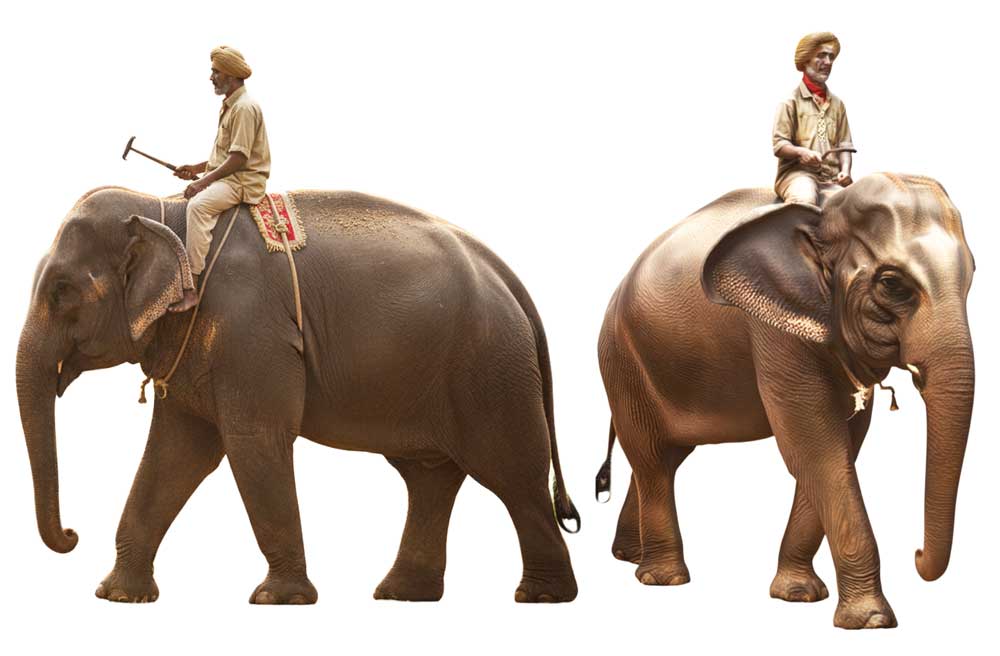
|
Posted on 18/03/26 4:10:39 PM |
|
DavidMac
Director of Photoshop Posts: 6198 Reply |
Re: Photoshop rotate object – WOW!!!
In all fairness about being fair Steve I did admit that myself in my post.
The rotation in yours is, in its way, quite astonishing and your point about the lighting is well taken but there is something in the quality of the rotated elephant (his head particularly) that I wouldn't want to submit to your criticism in a challenge ............. it screams AI! But again, to be fair, it's double jeopardy - an AI rotation of an AI creation! The difficulty is that Photoshop can't really rotate an object, particularly if the rotation is severe, it can only 'invent' a new one on the basis of information in the original. (Incidentally it's not always very good at information either ...... it's lost the coloured saddle cloth and rope, made a mess of the hammer thing in the mahout's hand and given him a red necktie where none existed.) I was never ever any better than good(ish) at drawing or painting. Photoshop gave me the tools to create things I had previously only dreamed of. It was a whole new freedom! But image creation by prompt writing feels like asking someone else to do it for me. It goes against the grain. But the truth is AI Photoshop can give someone having difficulty with the tools of 'traditional' pre AI Photoshop exactly the same liberating freedom that 'traditional' Photoshop gave me. The 'skill' of good Photoshopping is the pleasure of it for me. But that's totally personal. It's something else completely for other users. That's what makes it so fascinating. My real fear is that as we progressively accept and become inured to AI imagery, especially the more facile examples, we erode some of our critical faculties and, more importantly, our contact and connection with the process of image creation itself. But people said exactly that about photography as opposed to 'art'. In the end it's where we draw our personal lines. There is no doubt there will be a new generation of creative geniuses who will take AI visuals in new directions and to new heights we cannot even imagine. The tip of the iceberg is just visible, very occasionally, now. But ,for the most part, I do fear a future of visual mediocrity and creative laziness becoming the new normal. However much I try to rationalise and accept AI positively, in my heart, it still feels 'wrong' and lazy. Here's a parallel. When you create your Curieaux, Steve, you cobble together bits of other people's creations in a new way. It's a kind of physical photoshopping with tools and glue. "Objets Trouvés" on steroids! Nonetheless, each Curieaux is a unique Caplin creation in its own right. But here's my point. You, Steve, go down into your basement and you do it yourself. Your mind does the imagining and your hands do the cutting and gluing. Even with power tools, it's your hands do the setting and guiding. It's your hands do the painting, varnishing and polishing. If you had a mechanised super woodworking machine that was AI driven, you could simply sit at your computer upstairs and type in prompts (or just voice prompt) instructions for the juxtapositions of the elements and the various paint or varnish finishes you want! With dazzling super human speed the machine would assemble and finish it for you. WOW!! Or is it? Would that really feel the same? Would you really feel it was your creation? Would still you have that wonderful glow of sawdust covered achievement that physical creation can give? Somehow I very much doubt it! Like it or not that's where AI is taking us. Well I've been talking far too much and rather lost touch with rotating elephants! End of ramble .......... or should that be rantle? _________________ The subtlety and conviction of any Photoshop effect is invariably inversely proportional to the number of knobs on it ....... |
Posted on 19/03/26 1:14:14 PM |
|
Steve Caplin
Administrator Posts: 7169 Reply |
Re: Photoshop rotate object – WOW!!!
Of course, I see exactly what you mean. But there’s a difference between AI slop and creative use of AI. For me, the ability to modify an object to fit a space is a huge asset, and a real timesaver. Yes point taken about the quality of the faces etc, but now that PixelSquid has disappeared this gives me exactly what I need to adapt objects (and to a lesser extent people) to suit the job in hand. |
Posted on 19/03/26 1:14:14 PM |
|
Steve Caplin
Administrator Posts: 7169 Reply |
Re: Photoshop rotate object – WOW!!!
Of course, I see exactly what you mean. But there’s a difference between AI slop and creative use of AI. For me, the ability to modify an object to fit a space is a huge asset, and a real timesaver. Yes point taken about the quality of the faces etc, but now that PixelSquid has disappeared this gives me exactly what I need to adapt objects (and to a lesser extent people) to suit the job in hand. |
Posted on 19/03/26 10:07:55 PM |
|
DavidMac
Director of Photoshop Posts: 6198 Reply |
Re: Photoshop rotate object – WOW!!!
Yes. There is an almost inconceivable creative future for AI that is quite literally impossible to imagine now. Slop, will however be the undoubted majority. But maybe that's no different from now. Perhaps it's just new labels.
Good point. I was happy to use Pixelsquid (while it was still Pixelsquid). It wasn't that great but it was incredibly convenient and it worked! As you point out there's really no reason to put Rotate Object in a different category. It's an entirely viable substitute! But Adobe et al want us to believe it is the new reality. My difficulty is that I am worried that that may just be, precisely what it becomes. I am sure I must have quoted this here before but it does rather describe my dilemma: "An optimist is someone who believes that we live in the best of all possible worlds. A pessimist is someone who fears he is right!" _________________ The subtlety and conviction of any Photoshop effect is invariably inversely proportional to the number of knobs on it ....... |
Posted on 27/03/26 12:14:45 PM |
|
Frank
Eager Beaver Posts: 1870 Reply  |
Re: Photoshop rotate object – WOW!!!
I like it - seems these days AI is becoming another tool - |
Posted on 29/03/26 08:27:55 AM |
|
Nick Curtain
Model Master Posts: 1802 Reply  |
Re: Photoshop rotate object – WOW!!!
An interesting debate. My personal view is that this appears to be an amazing tool. Yes, it has flaws, but we're looking at an early Beta version and things can only get better with time. The groundwork is very promising. So do we want to use it and does it make us lazy? I think the answer lies in the the purpose for which we use Photoshop. We, the Friday Challenge Gang, are doing this for fun however, there are professionals out there who are up against tight deadlines and the enhancement will prove incredibly useful to them. I do have concerns though that AI, through advancement, could force redundancies within the industry where a simple prompt with words produces a perfectly acceptable image for publication. I know Steve has produced an article regarding this. So the choice to use, or not, is entirely ours and if ethics make us feel bad and we want to create images using good old fashioned methods, then that's the way to go. Personally, I feel that if Steve sets a challenge and we choose to use AI, then there is little point in taking part. That said, I've used AI once and that was to produce the wooden sign behind the witches weighing scales, only because I was up against a tight deadline to get to Sainsburys 
I do find sourcing good images to use very difficult. So many now are Getty or Alamy and I'm scared to use any of these. I would be interested to learn what others do? Nick |
Posted on 29/03/26 12:18:02 PM |
|
DavidMac
Director of Photoshop Posts: 6198 Reply |
Re: Photoshop rotate object – WOW!!!
Yes. I agree with you completely Nick. As Frank has pointed out and Steve earlier in this post AI can be regarded as simply another tool. That's easy to justify. After all, Photoshop itself is just another tool. As you say, Nick, it's a question of how much we want to use it and how much we want it to do for us. In my view, the more we rely on simply prompting what we want and letting AI do it for us, the more we erode our own personal input. The less we input, the less skilled we become. It's an inevitable vicious circle. My concern is that as we become accustomed to this we may also become inured to it. "Acceptable for publication" will in many cases be pretty dire. Commercial pressures to accept this could quickly become an excuse as much as a genuine stricture. In the end we don't need a crystal ball ........ One has only to look at the huge quantity of meretricious AI that is starting to fill the image libraries nowadays to see where this is all going. _________________ The subtlety and conviction of any Photoshop effect is invariably inversely proportional to the number of knobs on it ....... |